Welcome to the blog of the Sublette School District Educational Technology Department. This blog has been created for two purposes. The first is to share, celebrate, and discuss what is happening in classrooms across the district with community members. Over the past few weeks I have met with several parent groups and through discussions with them I have found that many parents are very interested in educational technology in general and specifically how the new one-to-one student devices will impact teaching and learning. Through a variety of posts on technology supported teaching and learning initiatives this blog will provide a window into how learning environments in our district are transforming as the result of investments into new hardware, software, and training.
The second purpose of this blog is to provide a space for teachers to share what is working as they experiment and reflect on their use of instructional technology. This blog will provide a forum for educators to share instructional narratives and have conversations with other teachers both inside of our district and outside of it. Often teaching can be an isolated job and it can be difficult to network with others in the education profession; however, one of the benefits of internet technologies is that there are now many media through which teachers can quickly and easily connect with others in the field to dialogue around what is best for students. This blog will serve in that capacity.
While Glen Egbert will serve as the main author and curator of this blog; teachers, students, administrators, and parents are welcome to make guest posts. If you would like to contribute please contact Glen via email at gegbert@sub1.org.
Showing posts with label start up. Show all posts
Showing posts with label start up. Show all posts
Saturday, April 26, 2014

Wednesday, April 17, 2013
#homerun
When you hear the word "Twitter", what's the first thing that pops into your head? When a past professor REQUIRED that I create a Twitter account my jaw dropped. The course I enrolled in was listed as Young Adult Literature. As far as I was concerned, Twitter had absolutely nothing to do with becoming a better middle school teacher. The only people I had ever heard of using Twitter were teenage girls with Bieber Fever.

Although many people use Twitter to follow what their favorite celebrities are eating for lunch, there is a far less publicized side of the Twitterverse that holds value for educators. I was reluctant when I first signed up for an account, but Twitter has won me over. My motivation for this post is to show you the value of Twitter as an educational tool, despite the negative preconceptions many of us hold.
We've all experienced great rewards in the classroom; helping a struggling student eventually succeed, receiving praise from a grateful parent, or having an administrator mark you as "distinguished" on an evaluation. These are all great experiences, but the gold medal for me as a teacher is the feeling I get when I've taught an absolute home-run-of-a-lesson. The kind of lesson where every student is engaged, authentic learning is taking place, and the next period class lines up at your door saying, "do we really get to _____ today?"
After experiencing one of these lessons the other day I decided to make a list of the 10 best lessons I've ever taught. What did all 10 of these lessons have in common? They all came from Twitter. I did not personally think any of these lessons up, I did not put a great deal of work into any of these lessons, and I had already seen pictures and videos of these lessons in action.
Here is an example of a conversation I stumbled upon the other day:
Army guys, clay, and markers? I decided to give it a try. The result? An absolute home run!

I'd like to take credit for this lesson, but the truth is I simply stole it from another teacher. That is the value I find in Twitter as an educator. It could be used to follow celebrities, tweet what you ate for lunch, or to make new virtual friends. As a teacher, I find Twitter valuable because it exposes me to new ideas and offers hundreds of ready to steal home run lessons.
How can you find these same resources?
Step 1: Sign up for a Twitter account. Here are some tips to get you started-
Choose a short Twitter name that captures who you are
Use a picture of yourself. When you attend meetings people will immediately recognize you
Your bio should tell about your interests and what you teach or supervise. This enables those viewing it to know who you are.
Step 2: Get involved in some Twitter Chats.
There are many chats now for most subject areas and grade levels. Twitter Chats are conversations focused around a specific "hashtag" on Twitter. A "hashtag" is simply a word on twitter preceded by the # symbol. If I want to find resources and conversations centered around social studies I use the #sschat hashtag.
Finding the conversations is simple, just type the hashtag into the search bar at the top of your Twitter page:
How do you know what hashtags to follow? Here is an index of what other teachers are using. Whether you teach 1st grade, high school math, or you are interested in standard based grading, there is a hashtag out there waiting for you.
If you have any questions or need help tweet @emakelky
- Eric Makelky
- Eric Makelky
Saturday, September 29, 2012
Off to a Great Start!
What a busy 2 weeks! We just finished up distributing devices to every student in grades 3-8. In addition 1.5 hours of training was delivered to every student that received a device. We covered topics such as initial set up, using Edmodo, accessing email, internet safety, privacy, cyber bullying, and appropriate use. Teachers and students did a great job working with the tech team to get everything configured. Here are some images from these roll outs:
We have also been getting information out to parents about the 1:1 devices. Three parent nights were hosted at Pinedale Middle School (you can see the video of that presentation here in English and here in Espanol; the slides are here), a one-to-one hands on parent boot camp was put on at the BOCES to demonstrate some of the classroom tools teachers will be using, and a presentation on the 1:1 initiative was put on at the Chamber of Commerce on Tuesday. Thanks to everyone that came out for these.
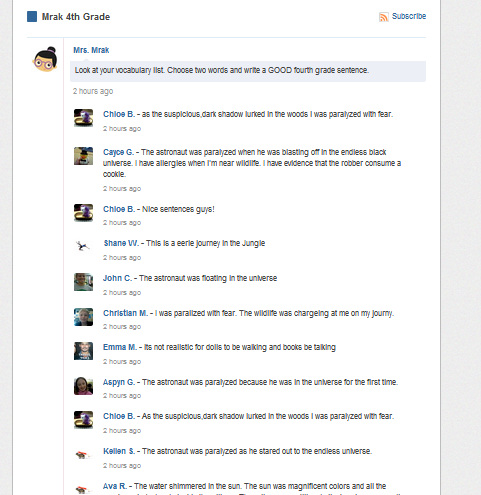
Two of the platform tools that we are training teachers to use are Google Apps for Education and Edmodo. Many teachers have already been implementing these tools this week. Here are a few screenshots of Edmodo from the training sessions to give you an idea of how it looks:

Subscribe to:
Posts (Atom)